CI Integration
ruff-sync is designed to be run in CI pipelines to ensure that all repositories in an organization stay in sync with the central standards.
Usage in CI
The best way to use ruff-sync in CI is with the check command. If the configuration has drifted, ruff-sync check will exit with a non-zero code, failing the build.
GitHub Actions
We recommend using uv to run ruff-sync in GitHub Actions.
Basic Check
name: "Standards Check"

on:
  pull_request:
    branches: [main]

jobs:
  ruff-sync:
    runs-on: ubuntu-latest
    steps:
      - uses: actions/checkout@v4
      - uses: astral-sh/setup-uv@v5
      - name: Check Ruff Config
        run: uvx ruff-sync check --semantic --output-format github
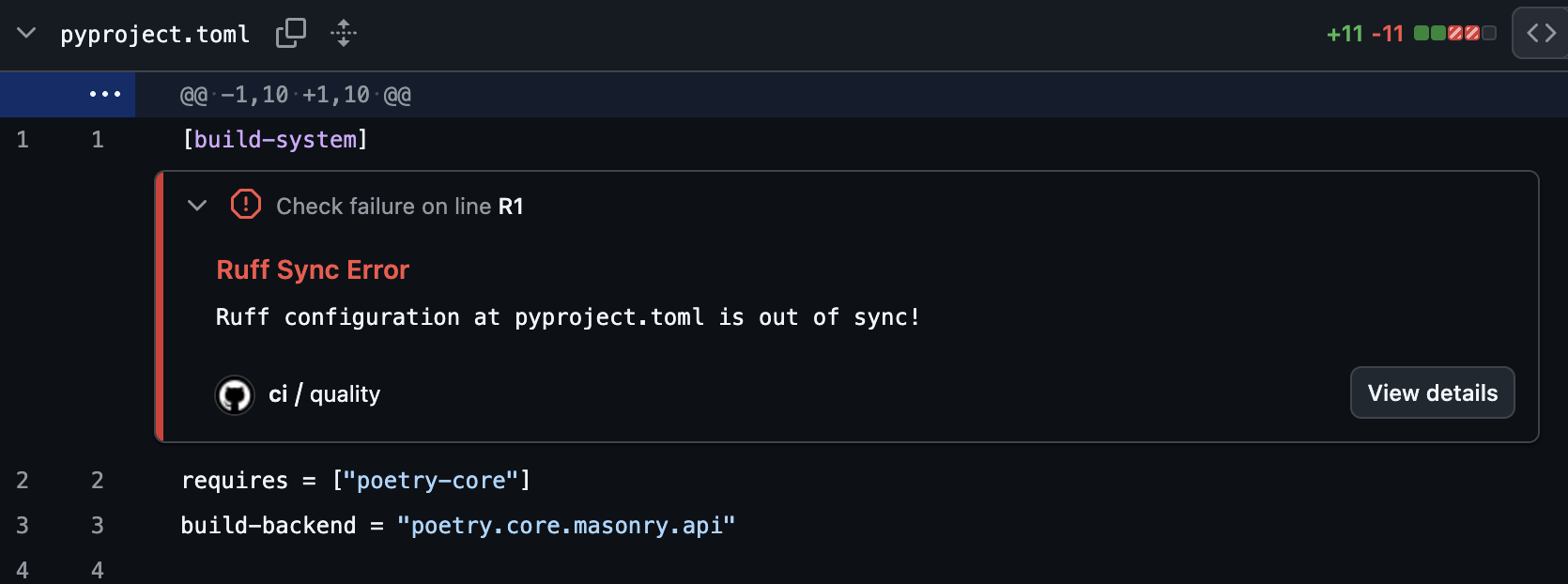
By using --output-format github, ruff-sync will emit special workflow commands that GitHub translates into inline annotations directly on your Pull Request's file diff.
SARIF Upload (GitHub Advanced Security)
For repositories with GitHub Advanced Security enabled, upload SARIF results to track drift findings in the Security tab and get per-key inline PR annotations:
- name: Check Ruff config (SARIF)
  run: ruff-sync check --output-format sarif > ruff-sync.sarif || true

- name: Upload SARIF results
  uses: github/codeql-action/upload-sarif@v3
  with:
    sarif_file: ruff-sync.sarif
    category: ruff-sync
The || true ensures the upload step always runs even when drift is detected (exit code 1).
Why SARIF over
--output-format github? Thegithubformat creates ephemeral PR annotations that disappear after the check re-runs. SARIF findings are persisted in the Security tab, tracked as "introduced" and "resolved" across branches, and each drifted TOML key (lint.select,target-version, etc.) appears as a separate, deduplicated finding.
Automated Sync PRs
Instead of just checking, you can have a bot automatically open a PR when the upstream configuration changes.
name: "Upstream Sync"

on:
  schedule:
    - cron: '0 0 * * 1' # Every Monday at midnight
  workflow_dispatch:

jobs:
  sync:
    runs-on: ubuntu-latest
    steps:
      - uses: actions/checkout@v4
      - uses: astral-sh/setup-uv@v5
      - name: Pull upstream
        run: uvx ruff-sync
      - name: Create Pull Request
        uses: peter-evans/create-pull-request@v6
        with:
          commit-message: "chore: sync ruff configuration from upstream"
          title: "chore: sync ruff configuration"
          body: "This PR synchronizes the Ruff configuration with the upstream source."
          branch: "ruff-sync-update"
GitLab CI
Code Quality Report (Free tier)
Use --output-format gitlab to produce a GitLab Code Quality report. This appears in the MR widget on the Free tier and as inline diff annotations on Ultimate.
ruff-sync-check:
  stage: lint
  image: ghcr.io/astral-sh/uv:latest
  script:
    - uvx ruff-sync check --semantic --output-format gitlab > gl-code-quality-report.json
  artifacts:
    when: always          # Upload even when ruff-sync exits 1 (drift detected)
    reports:
      codequality: gl-code-quality-report.json
    paths:
      - gl-code-quality-report.json   # Also expose for download/browsing
    expire_in: 1 week
  rules:
    - if: '$CI_PIPELINE_SOURCE == "merge_request_event"'
    - if: '$CI_COMMIT_BRANCH == "main"'
SAST Report / SARIF (Ultimate tier)
Use --output-format sarif to feed the GitLab Security & Compliance dashboard via the sast artifact report type:
ruff-sync-sarif:
  stage: lint
  image: ghcr.io/astral-sh/uv:latest
  script:
    - uvx ruff-sync check --output-format sarif > ruff-sync.sarif
  artifacts:
    when: always
    reports:
      sast: ruff-sync.sarif
    paths:
      - ruff-sync.sarif
    expire_in: 1 week
  rules:
    - if: '$CI_PIPELINE_SOURCE == "merge_request_event"'
Why SARIF over
codequality? SARIF is a portable, vendor-neutral format — the same file works for GitHub Advanced Security, GitLab SAST, SonarQube, and IDE extensions. It also carries per-key granularity: each drifted TOML key is a separate finding with a stable fingerprint that is tracked as "introduced" or "resolved" across pipeline runs. Usecodequalityfor lightweight GitLab-native linting feedback; usesarifwhen you need cross-platform compatibility or want findings tracked in a security dashboard.
You can use ruff-sync with pre-commit to ensure your configuration is always in sync before pushing.
See the Pre-commit Guide for details on using the official hooks.
Exit Codes
| Code | Meaning |
|---|---|
| 0 | In sync — no drift detected |
| 1 | Config drift — [tool.ruff] values differ from upstream |
| 2 | CLI usage error — invalid arguments (reserved by argparse) |
| 3 | Pre-commit hook drift — use --pre-commit flag to enable this check |
| 4 | Upstream unreachable — HTTP error or network failure |
All non-zero codes cause a CI step to fail. Use artifacts: when: always (GitLab) or if: always() (GitHub Actions) to ensure report artifacts are uploaded even when the job fails.
💡 Best Practices
[!TIP] Read the complete Best Practices guide for a broader look at organizing
ruff-syncdeployments, including when semantic checks should be blocking vs. informational.
Use --semantic
In CI, you usually only care about the functional configuration. Using --semantic ensures that minor formatting changes don't break your builds, while still guaranteeing that the actual rules are identical.
Handle Exclusions Properly
If your project intentionally diverges from the upstream (e.g., using different per-file-ignores or ignoring a specific rule), ensure those overrides are listed in the [tool.ruff-sync] exclude list in your pyproject.toml.
The check command respects your local exclude list. If you exclude a setting, ruff-sync check will completely ignore it when comparing against the upstream, ensuring that intended deviations never cause CI to fail!
Use a Dedicated Workflow
Running ruff-sync as a separate job in your linting workflow makes it easy to identify when a failure is due to configuration drift rather than a code quality issue.